The Ultimate Guide to Monetizing Twitch With Subscriptions
The most successful channels aren’t the ones that demand subscriptions. They are the ones that have built a loyal, engaged, and supportive community. Focus on delivering entertaining content, interacting authentically with your chat, and providing meaningful value through the perks you offer. Turn your stream into a place where people want to belong, and the subscriptions will follow.
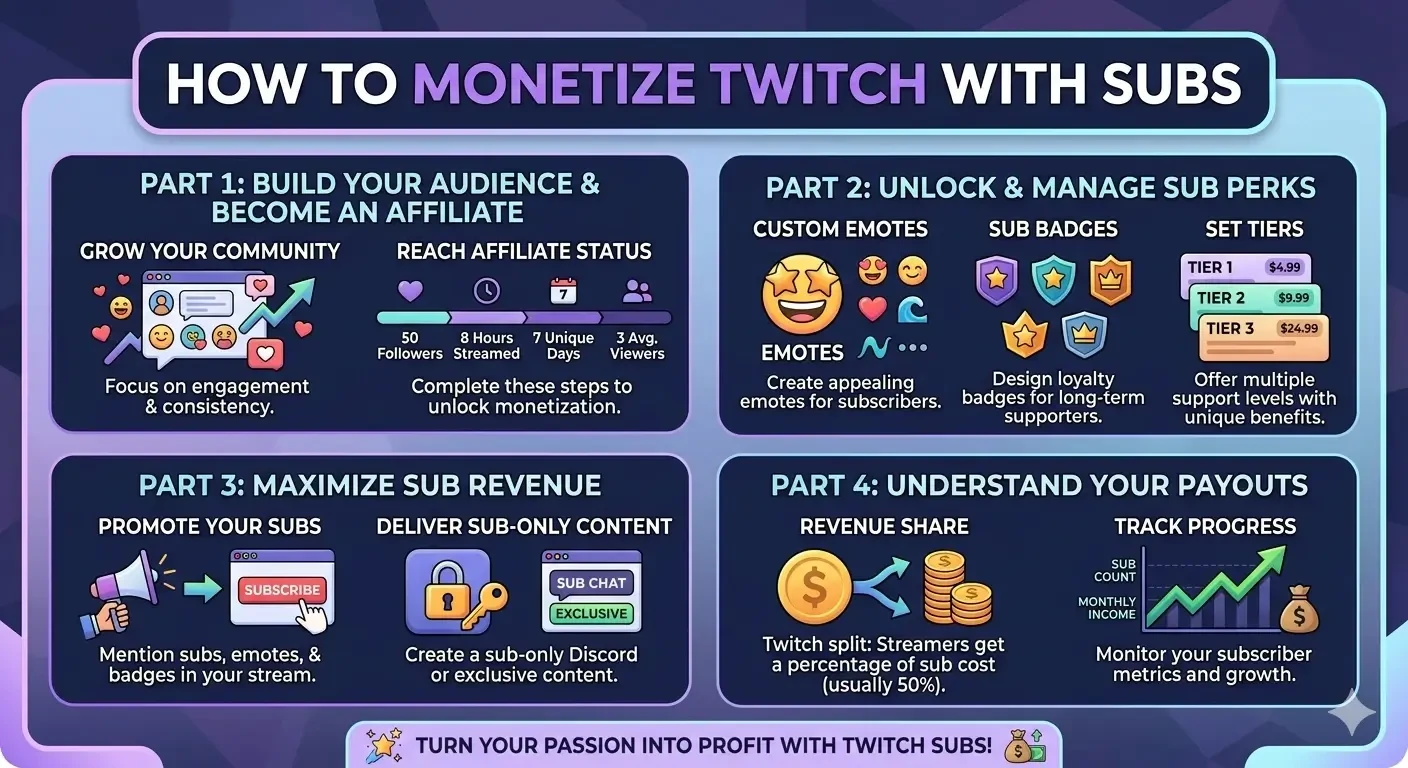
Image: Guide to earning revenue on Twitch through subscription monetization.
You’ve built your channel, you have a regular stream schedule, and you’re seeing your viewer count climb. Now, you’re ready to take the next step: earning revenue on Twitch.
For many creators, Twitch subscriptions are the primary source of consistent income. They move beyond occasional donations or ad revenue, offering a stable way to build your financial future around your passion. This guide will walk you through everything you need to know about setting up, maximizing, and managing subscriptions on your channel.
1. Prerequisites: How to Offer Subs
Before you can accept subscriptions, you must be a member of the Twitch Affiliate Program or the Twitch Partner Program.
Most streamers begin as Affiliates. To qualify, you must achieve the "Path to Affiliate" achievement:
- Reach 50 followers.
- Stream for 8 hours.
- Stream on 7 different days.
- Average of 3 viewers (simultaneous) over 30 days.
Once you hit these milestones, you’ll be invited to onboard as an Affiliate, which unlocks several monetization tools, including subscriptions and the ability to accept Bits. Partners have much stricter requirements and enjoy different revenue sharing structures and additional benefits.
2. Setting Up Subscription Tiers and Perks
Twitch offers three subscription tiers. Each level offers the creator a different amount of revenue share and the viewer different benefits.
- Tier 1 ($4.99): The basic subscription level, often used for standard support.
- Tier 2 ($9.99): A higher support level, usually providing extra perks.
- Tier 3 ($24.99): The premium support tier, for those who want to provide maximum financial assistance to the channel.
Custom Emotes and Badges
One of the biggest reasons viewers subscribe is to access exclusive channel emotes. These are custom emojis your subscribers can use across all of Twitch. The more subscribers you have, the more emote slots you unlock.
Your Action Item: Dedicate time to designing (or commissioning) high-quality, relevant emotes. Consider emotes for common situations: hype, confusion, laughing, and giving thanks. Tier 2 and Tier 3 subs can get their own exclusive emotes to further incentivize upgrading.
Sub Badges: These are distinct icons that appear next to a subscriber's name in chat. They evolve over time (1 month, 3 months, 6 months, 1 year, etc.), incentivizing long-term support. You can customize these badges to reflect your brand.
3. Strategies to Maximize Sub Revenue
Now that subscriptions are available, how do you encourage your viewers to support you financially?
Promote the Benefits (Don't Just Ask for Money)
Instead of begging for subs, remind your audience what they get for supporting the channel.
- "Remember to use your Prime sub before it expires!"
- "Subs unlock our new 'HYPE' emote!"
- "No ads for subscribers, so you won’t miss any game highlights."
- "Don’t forget that all subs help fund the new streaming PC!"
Create Subscriber-Only Content and Experiences
Offer incentives beyond emotes to further justify the cost:
- Sub-Only Discord Channels: Create a private section of your community server just for subscribers to chat and organize games.
- Movie Nights or Community Games: Host specific events that are open only to subs (be careful not to violate Twitch Terms of Service).
- Sub-Only Chat: Use this feature sparingly during particularly chaotic streams to let your dedicated community have a clearer voice.
- Early Access: If you create YouTube videos or other content, consider giving subscribers early access.
Set Realistic Goals
Use the Goals overlay on your stream. Setting a visible "Sub Goal: New Emote at 50 Subs" or "Charity Stream Goal" can motivate the entire community to work together and subscribe.
4. Understanding Your Payouts
The revenue share you receive from subscriptions depends on your status.
- Affiliates: Generally receive a 50% split of all net subscription revenue (after payment processing, taxes, and fees).
- Partners: Negotiate their contracts and often receive a higher percentage, with top-tier partners historically earning a 70% share of sub revenue (this varies heavily and has changed over time).
Track Your Progress
Use your Creator Dashboard to monitor your metrics:
- Subscriber Count: How many active subs do you have?
- Sub Points: A different metric used to calculate emote slots. Tier 1 = 1 point, Tier 2 = 2 points, Tier 3 = 6 points.
- Monthly Income: View your estimated payout based on sub activity.
Twitch payouts occur once you reach a minimum threshold ($50 for most payment methods, $100 for some others like wire transfers). Payouts are on a net-15 basis (you are paid 15 days after the end of the month you earned the income).
Summary: Focus on Community First
The most successful channels aren’t the ones that demand subscriptions. They are the ones that have built a loyal, engaged, and supportive community. Focus on delivering entertaining content, interacting authentically with your chat, and providing meaningful value through the perks you offer.
Turn your stream into a place where people want to belong, and the subscriptions will follow.
Published at Apr 28, 2026